Steps
- Check what your plan includesClover's Accounting Sync for QuickBooks Online comes at no extra cost on the plans that include it. Ask Clover or your reseller if yours does.
- Or install an appOn your Clover web dashboard, open the App Market, find a QuickBooks app and select Connect. Install it from a computer, not the Clover device.
- Connect QuickBooksIn the app, sign in to QuickBooks Online as the admin and pick your company file.
- Map your accountsMatch Clover's categories, taxes, tips and payment types to accounts in your chart of accounts.
- Check the first dayMost apps post the previous day overnight. Compare the first day against Clover's Sales report before you rely on it.
- Or export by handIn the dashboard, go to Reports, Sales report, pick the dates and select Options, Export. Your bookkeeper enters it as a daily journal entry.
Daily summary, not every sale
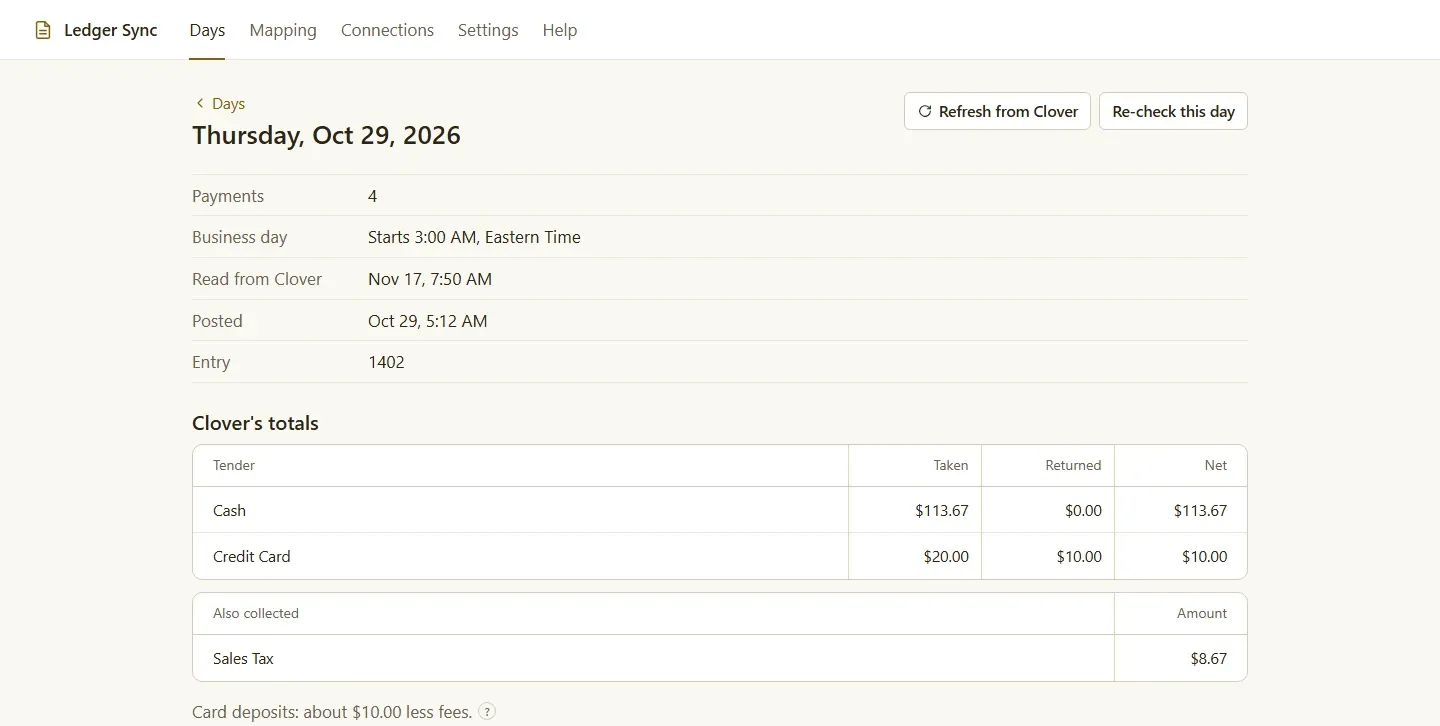
Most Clover-to-QuickBooks setups post one entry per day, not one per order. That keeps your books readable: sales by category, sales tax by rate, tips, discounts, refunds and each payment type, adding up to what Clover shows. Your accountant gets a clean daily line instead of thousands of tiny sales receipts, and you can always open Clover for the detail of any one sale.
What a daily entry looks like
A balanced day has a credit for each kind of sale and a debit for each way the money came in:
- Income: sales by category, such as Food, Drinks and Retail.
- Against income: discounts and refunds.
- Liabilities: sales tax by rate, tips you owe staff, and gift cards sold but not yet used.
- Money in: card payments to a clearing account, and cash to Undeposited Funds.
The debits equal the credits. If they don’t, something is mapped wrong, and the entry shouldn’t post.
Things to know before you connect
- Card fees. Clover deposits card sales minus fees. Post card sales to a clearing account and match it against the deposits.
- Sales tax. A daily journal entry records the tax you owe, but it won’t appear in QuickBooks’ Sales Tax Center. File from Clover’s reports.
- QuickBooks Desktop. Many sync apps only support QuickBooks Online; check before you install.
- Closed months. If your accountant has closed a month, a late refund should post as an adjustment, not change the closed month.
- Late changes. Tips are often adjusted the next day, and refunds can come days later. A good sync checks back over recent days and corrects them.
What Clover can’t do on its own
Clover is a point of sale, not a set of books. Without a sync, it can’t:
- post anything to QuickBooks on plans without Accounting Sync;
- connect to Xero, if that’s what your bookkeeper uses;
- tell you what it charged in card fees on a given day, because the deposit arrives already net of fees.
Choosing an option
If your plan includes Clover’s Accounting Sync and you use QuickBooks Online, start there; it costs nothing extra. Look at an App Market app if you use Xero, run several stores in one company file, close your day after midnight, or want late tips and refunds corrected on their own. Exporting by hand works for a store with a bookkeeper who already keys in a daily total, but it’s the slowest option and the easiest to get wrong.
What it costs
Clover’s Accounting Sync costs nothing extra on the plans that include it. App Market apps charge a monthly fee through your Clover bill; Ledger Sync, for example, is $19.95 a month after a 30-day free trial. Exporting by hand costs only your bookkeeper’s time, which is usually the most expensive option of the three.
Checking the first week
Whatever you choose, compare the first week of entries against Clover’s Sales report, day by day. Check the sales total, the tax, the tips and the card total. Once a week matches, you can trust the rest.
Questions
Does Clover integrate with QuickBooks?
Yes. Clover's own Accounting Sync sends daily sales to QuickBooks Online on plans that include it. Apps on the Clover App Market do the same, and any plan can export reports for your bookkeeper.
Does Clover work with QuickBooks Desktop?
Many sync apps only support QuickBooks Online. If you use QuickBooks Desktop, check that an app supports it before you install, or export Clover's reports and enter them by hand.
Should every Clover sale go into QuickBooks?
Usually not. One summary entry per day keeps your books readable and still adds up to what Clover shows. Your sales detail stays in Clover's reports.
Why doesn't the deposit match my card sales?
Clover deposits card sales minus fees. Post card sales to a clearing account, then match the deposits against it; what's left is your processing fees.
Will sales tax show in QuickBooks' Sales Tax Center?
Not from a daily journal entry. The tax you owe is recorded, but file your returns from Clover's reports.
Ledger Sync, quickbooks and xero for Clover
Ledger Sync connects Clover to QuickBooks Online or Xero. Every night it posts the day's Clover sales as one balanced journal entry, and tells you in plain words when a day can't post.