What it does
- Two-way stock sync that merges sales from both sides, so neither overwrites the other.
- Links items by SKU, then by barcode.
- A review page for anything that didn’t match: link it by hand or ignore it.
- Never creates, deletes or zeroes your catalog.
- Price and name sync in one direction you choose.
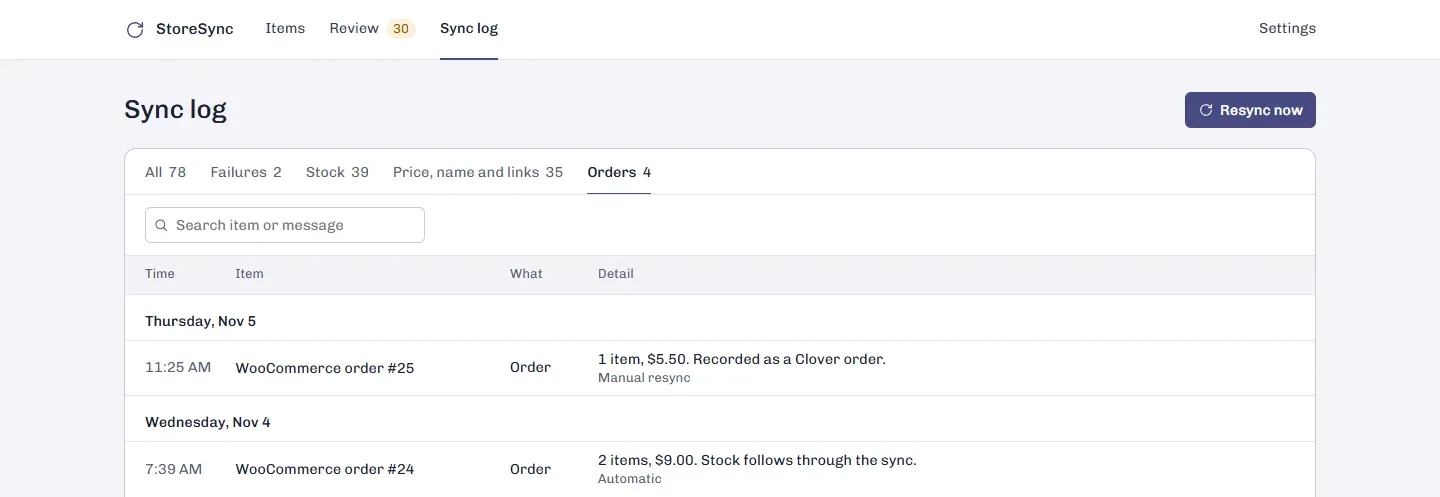
- Online orders can be recorded as Clover orders.
- A log of every stock, price, name and order change, with the reason for any failure.
- Syncs every minute, plus right away when the store tells us about a change.
How it works
- Open StoreSync from Clover and connect Shopify or WooCommerce.
- It links matching items by SKU or barcode.
- Link or ignore the rest on the review page.
- Sales on either side update the other. Check the log any time.
What never changes
StoreSync never creates, deletes or zeroes items in either catalog. If an item isn’t linked, its stock is left alone. Price and name sync only when you turn them on, only in the direction you pick, and only when the source actually changes, so an edit you make on the other side isn’t overwritten every minute.
Before you connect
Check that each product has the same SKU or barcode on both sides; that’s what StoreSync links on. Variants link one by one, so a T-shirt in three sizes needs three matching codes. Anything StoreSync can’t link with certainty waits on the review page instead of being guessed. When it writes a count to Shopify, it checks the count there hasn’t changed in the meantime, so two updates can’t cross.
Several stores
Each Clover store matches one Shopify location. A second Clover store installs StoreSync on its own and links to its own location.
Who it’s for
Shops that sell in store on Clover and online on Shopify or WooCommerce.
Good to know
StoreSync doesn’t copy products between stores, add new products or sync images and descriptions. Etsy, eBay and TikTok Shop aren’t supported.
Questions
Does Clover integrate with Shopify?
Clover and Shopify are separate systems, so stock you sell in one doesn't come off the other on its own. StoreSync connects them and keeps stock counts the same on both.
How often does it sync?
Every minute, and right away when Clover or Shopify tells StoreSync about a change. You can also press Resync now.
What if an item sells in the store and online at the same time?
Both sales count. StoreSync merges the two sides, so the new count is what's left after both sales, and neither side overwrites the other.
How are items matched?
By SKU, then by barcode, and only when there's exactly one match. Anything else goes to a review page where you link it by hand or ignore it.
Does it work with WooCommerce?
Yes, the same way as Shopify: stock both ways, and price and name in one direction you choose.
Do online orders show up in Clover?
If you turn it on. Each online order becomes a Clover order named like Shopify #1001, with its items, shipping, tax and discounts, paid with an external payment so it isn't counted as a card sale twice.