
What it does
- Stock counts that save as you type, and account for sales made while you counted.
- Count and receive on a Clover device with a keypad and barcode scanner.
- Receive deliveries with or without a purchase order. Quantity and average cost go to Clover once, never twice.
- A reorder list with suggested reorder points from 30 days of sales.
- Vendors and purchase orders, with a PDF.
- Recipes: a sale, or a modifier like Extra shot, uses up its ingredients.
- Transfers between your stores.
- Stock value and profit reports.
How it works
- Open Stock Desk from Clover. It reads your items.
- Count shelves on the device or the web.
- When a delivery arrives, scan items in against the purchase order. Costs update in Clover.
- Check the reorder list and reports to see what to buy and what you’re making.
Counting
Start a count on the web or a Clover device and type or scan as you go. Each number saves as it’s typed, and a number typed on the device stays on it until the server has it, so a dropped connection doesn’t lose a count. When you apply the count, Stock Desk shows what will change before it writes anything to Clover.
Receiving and spreadsheets
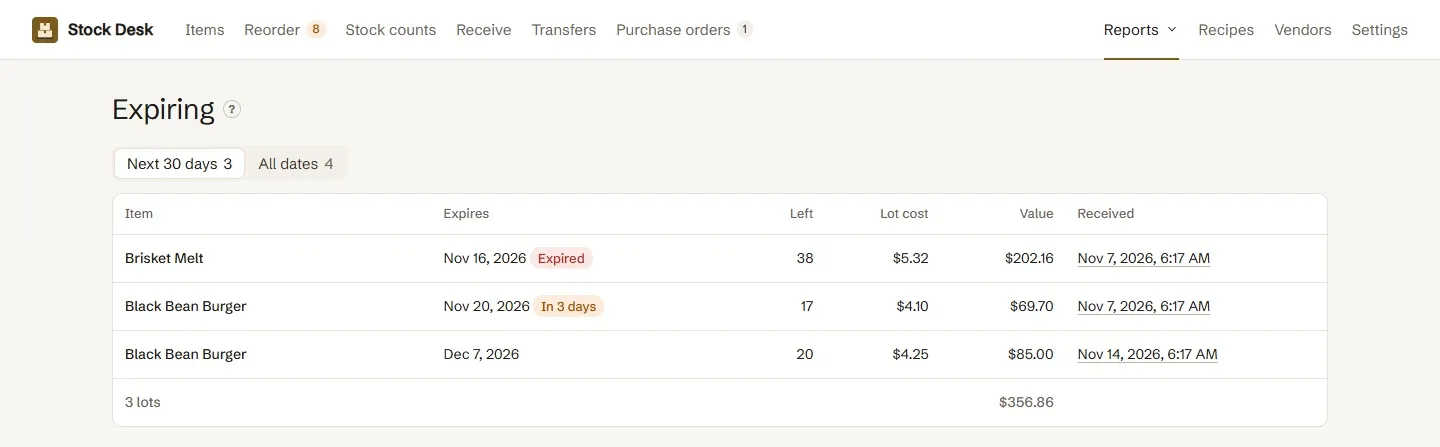
Receive against a purchase order or without one. Each line adds its quantity to Clover once, never twice, and records the cost and an optional expiry date for that lot. The spreadsheet import matches rows by Clover ID, SKU, barcode or name, lists every change on a check page, and stops the whole file if a row is wrong, for example a barcode that Excel turned into 4.1E+11.
Also included
Adjustments record waste, breakage, theft and own use, with a shrinkage report that shows what they cost. Receiving can record an expiry date and cost for each lot. You choose who can change stock and setup.
Who it’s for
Shops, cafes, restaurants, bars and grocers that track what’s on the shelf.
Good to know
Emailing purchase orders to vendors comes in a later version; until then, send the PDF yourself. A refund doesn’t put recipe ingredients back.
Questions
How do I add inventory to Clover?
In Clover itself, add items in the web dashboard under Items, one by one, by scanning barcodes, or by importing Clover's spreadsheet template (.xls or .xlsx, up to 5 MB). Stock Desk adds stock when you receive a delivery, and can import items, costs, prices and stock levels from a spreadsheet it checks first.
What happens to sales made while we count?
They're accounted for. When you apply a count, Clover gets the number you counted plus whatever sold or changed since that line was counted.
How does Stock Desk work out an item's cost?
As a moving average. When you receive, the new cost is the old cost times what was on hand, plus the delivery's cost times its quantity, divided by the new total.
How are reorder points suggested?
From the last 30 days of sales. The reorder point covers the vendor's lead time, and the order fills up to two more weeks of sales. You can set your own numbers instead.
Which barcode scanners work?
On a Clover Station, any USB or Bluetooth scanner that types the code. On a Flex or Mini, Clover's camera scanner. Each scan counts one unit.
Who can change stock?
By default only the owner can change stock and setup. You can open either to admins, managers or everyone; counting and reports are open to all staff.